llama.cpp 'failed to allocate buffer for rs cache': Fix Recurrent-State OOM
Fix llama.cpp startup failures reporting failed to allocate buffer for rs cache by separating recurrent-state memory from KV cache, GPU weights, and server concurrency.
Approximately 6 min read
If llama-server loads the weights but fails with:
failed to initialize the context: failed to allocate buffer for rs cache
start with one server slot (-np 1) and a small context, then read the RS/KV/compute allocation lines. If that works, raise slots and context separately until the failing memory boundary is clear.
This is recurrent-state (RS) memory, not the normal transformer KV cache. A hybrid/recurrent model can fit its weights and still fail later when RS, KV, and compute buffers are allocated.
The precise point of failure
In src/llama-memory-recurrent.cpp, llama.cpp constructs tensors for recurrent memory and calls ggml_backend_alloc_ctx_tensors_from_buft. If the backend returns no buffer, this path throws:
failed to allocate buffer for rs cache
That distinction rules out one common misdiagnosis: the error does not by itself mean the model file is corrupted or the tokenizer is missing.
RS memory can depend on the recurrent architecture, number of states/sequences, tensor dimensions and selected backend. The current source contains a state-row calculation involving mem_size and n_rs_seq. These internal details are version-sensitive; use startup logs from the installed binary rather than guessing the required number of bytes.
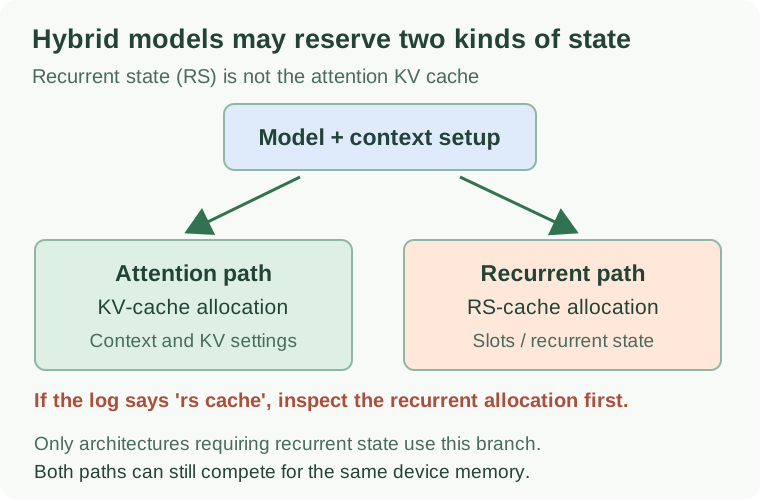
Not all models require recurrent state. Separate the failing allocator path before changing context, slots or device placement.
For comparison, a public Qwen3.5 report in llama.cpp issue #20049 shows separate llama_kv_cache and llama_memory_recurrent buffer-size log lines. That is evidence of the distinction, not proof that every Qwen model has identical memory behavior.
Collect the right baseline first
Capture the binary version, device visibility, the command you actually used, and free memory:
./build/bin/llama-server --version
./build/bin/llama-server --list-devices
nvidia-smi
On other backends, use the relevant device-memory tools. Do not publish complete logs if they contain private paths, credentials or prompts.
Start with the earliest device allocation failure, not only the final server exception. Look for:
model buffer size: memory occupied by model weights.KV buffer size: ordinary attention key/value storage.RS buffer size: recurrent state storage.compute buffer size: graph execution workspace.- Backend allocation messages indicating a failed device allocation.
A missing RS-size line can mean the allocation failed before the normal summary was printed.
Step 1: collapse to one server slot
The current llama-server option reference documents -np, --parallel N for server slots. This is an important dimension for recurrent-state workloads. Do not start by running dozens of parallel slots merely because that seems useful for throughput.
Try a deliberately small baseline:
./build/bin/llama-server -m /path/to/model.gguf -c 4096 -np 1
If that works while a larger -np setting fails, the difference supports a concurrency-related memory hypothesis. It does not establish that every additional slot uses the same fixed amount of memory; verify the RS and KV sizes printed by your installed build.
If the one-slot baseline still fails, go to the next step instead of repeatedly increasing -np.
Step 2: separate context length from RS state
The -c, --ctx-size setting controls prompt-context capacity. Reducing it can relieve KV-cache pressure, which may leave VRAM available for RS and compute allocations. But RS sizing may have its own sequence-dependent behavior; smaller context does not imply the RS allocation itself shrinks proportionally.
Make two controlled runs with only context changed:
./build/bin/llama-server -m /path/to/model.gguf -c 4096 -np 1
./build/bin/llama-server -m /path/to/model.gguf -c 8192 -np 1
Compare the individual buffer-size lines. If the KV cache grows while the RS size stays stable, that is useful evidence. If both change, investigate the engine’s current recurrent-state implementation. Do not label either outcome a universal rule.
The model’s advertised training context length does not mean the host has enough memory to serve that entire length with your chosen number of slots.
Step 3: free memory without changing model semantics
First close competing GPU processes and verify that the desired GPU is actually available. Check the selected backend and offload configuration. A GPU-enabled binary can still allocate weights, KV or RS on different devices according to placement rules.
The current server documentation exposes --fit, enabled by default, which attempts to adjust unset arguments to fit device memory. Read the fit diagnostic lines: “fit enabled” is not the same as “the final allocation succeeded.” Explicit memory-related overrides can constrain what an automatic fitter can change.
If an allocation still fails, consider a smaller model or quantization, or reduce GPU-offloaded layers to leave memory headroom. That changes performance and placement, so compare one parameter at a time. Be mindful that a smaller weight allocation does not automatically solve every recurrent-state, KV or compute-workspace limit.
Step 4: distinguish the three cache failures
| Error text | Where to start |
|---|---|
failed to allocate buffer for rs cache |
Recurrent-state backend allocation, slots, total memory pressure |
failed to allocate buffer for kv cache |
Context capacity, KV placement, KV data type |
failed to allocate compute pp buffers |
Graph compute workspace, free headroom, batch settings |
These errors can have a shared resource-pressure cause but occur in distinct allocation paths. Treat the first failing allocation and its preceding device warnings as primary evidence.
For separate symptoms, RAMGPT already has a KV-cache allocation guide and a compute-buffer allocation guide. This page specifically addresses recurrent-state allocation rather than repeating those guides.
Step 5: verify recovery, not only startup
A successful model load is the first gate. Verify that the server can generate a short response, then gradually raise the context and slot count while recording memory headroom and reliability. The test should include more than one sequential request so that persistent and per-request memory behavior can be observed.
A controlled record is more useful than the statement “fixed by lowering context”:
| Run | Context | Slots | RS allocation | Outcome |
|---|---|---|---|---|
| A | 4096 | 1 | Record log size | Loaded or failed |
| B | 8192 | 1 | Record log size | Loaded or failed |
| C | 4096 | 2 | Record log size | Loaded or failed |
Those are test settings, not measured results. Keep model, runtime version, offload configuration and competing processes constant.
Decision path
If the small one-slot baseline loads, increase concurrency or context separately until you identify the pressure point. If it does not load, inspect placement, allocation warnings, RS state dimensions and total free memory. If the same controlled case changes from success to failure across binaries, record both versions and investigate an upstream regression with a minimal public reproduction.
Do not infer model corruption from an RS cache allocation failure. The error is a memory-allocation signal produced by a specific source-code path.
Primary sources
- llama.cpp recurrent memory allocation source
- llama.cpp server parameters
- Public Qwen3.5 KV and RS memory example, issue #20049